Not every good monitor needs to be a four-figure purchase. This list keeps the budget grounded while still filtering for genuinely strong specs.
Top Picks
These picks come straight from the current DisplayNerd monitor archive and are ranked using the same normalized fields already used across the database, shortlist, and comparison tools.
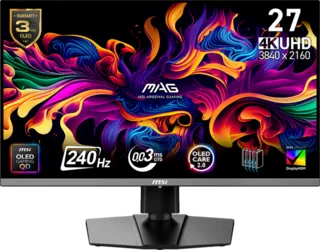
1. MSI MAG 272UP QD-OLED X24 27
QD-OLED panel • 4K • 240Hz • 138% sRGB This 26.5" model pairs QD-OLED panel tech with 4K output and 240Hz refresh headroom.
- Nerd score: 9.8/10
- Panel: QD-OLED, OLED/AMOLED
- Brightness: 1000 nits
- Price: €717
- Open monitor profile
2. Philips Evnia 27M2N8500/27 27
QD-OLED panel • 1440p • 360Hz • 147.5% sRGB This 26.5" model pairs QD-OLED panel tech with 1440p output and 360Hz refresh headroom.
- Nerd score: 9.2/10
- Panel: OLED/AMOLED, QD-OLED
- Brightness: 250 nits
- Price: €600
- Open monitor profile
3. MSI MAG 272UP QD-OLED X24 27
QD-OLED panel • 4K • 240Hz • 99% sRGB This 26.5" model pairs QD-OLED panel tech with 4K output and 240Hz refresh headroom.
- Nerd score: 9.0/10
- Panel: QD-OLED, OLED/AMOLED
- Brightness: 250 nits
- Price: €717
- Open monitor profile
4. MSI MPG 274URF QD 27
IPS panel • 4K • 160Hz • 145% sRGB This 27" model pairs IPS panel tech with 4K output and 160Hz refresh headroom.
- Nerd score: 8.9/10
- Panel: IPS, LED-backlit, LCD
- Brightness: 400 nits
- Price: €520
- Open monitor profile
5. ASRock Phantom Gaming PGO27QFS 27
OLED panel • 1440p • 240Hz • 129% sRGB This 27" model pairs OLED panel tech with 1440p output and 240Hz refresh headroom.
- Nerd score: 8.8/10
- Panel: OLED/AMOLED
- Brightness: 275 nits
- Price: €500
- Open monitor profile
6. ASRock Phantom Gaming PGO27QFS 27
OLED panel • 1440p • 240Hz • 129% sRGB This 27" model pairs OLED panel tech with 1440p output and 240Hz refresh headroom.
- Nerd score: 8.8/10
- Panel: OLED/AMOLED
- Brightness: 275 nits
- Price: €500
- Open monitor profile
How To Use This List
Start with the top two or three options, then open each monitor profile to compare panel type, refresh rate, brightness, ports, and pricing. If two models are close, use the comparison bench to make the tradeoffs obvious.
What To Check Before Buying
- Resolution and screen size should match your GPU power and desk distance.
- Panel type changes how much you should expect from HDR, contrast, and motion clarity.
- Port selection matters more than it sounds once consoles, laptops, and docking setups enter the picture.